ESP32S3-WS-LCD128

Tags: chip:esp32s3

../../../../../_images/ESP32-S3-Touch-LCD-1.28.jpg

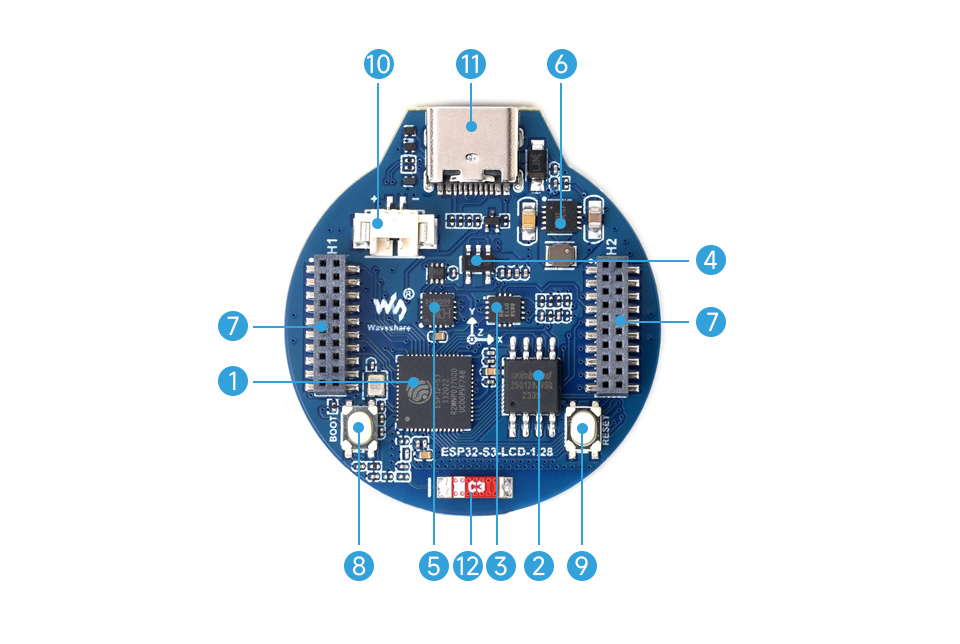
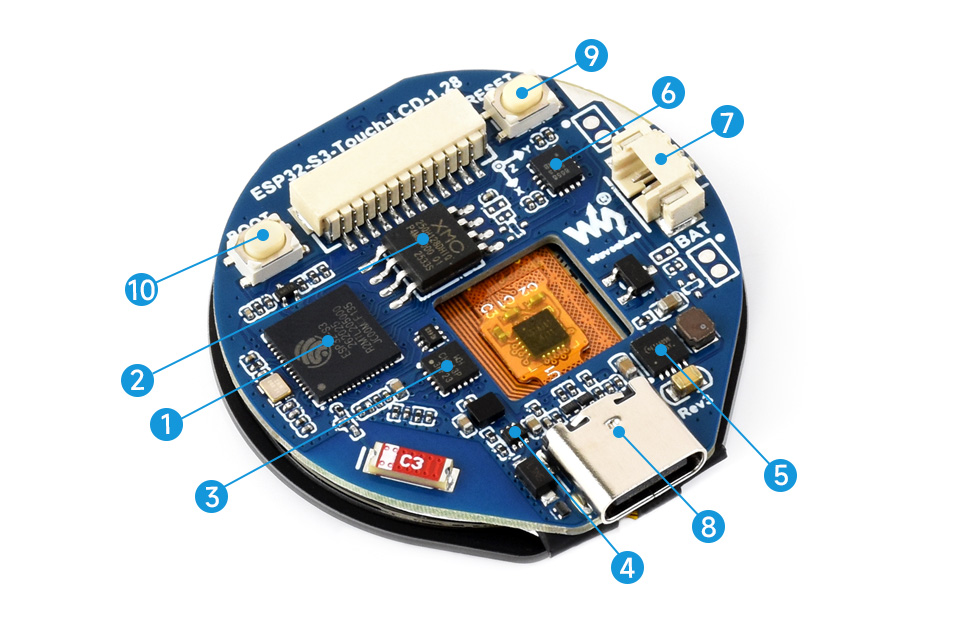
This board definition is a starting point for development with ESP32-S3-LCD-1.28 and ESP32-S3-Touch-LCD-1.28 which are low-cost ($16/$22) open-source hardware designed by WaveShare. High-performance Xtensa based ESP32-S3 MCU, small size, onboard round 1.28” LCD display, capacitive touch screen (Touch version only), Li-ion accumulator charge manager, 6-axis sensor (3-axis accelerometer and 3-axis gyroscope), and quick module attachmend 1.27mm connectors (non-Touch version only), makes it a perfect candidate for integration into your projects and products quickly.

../../../../../_images/ESP32-S3-LCD-1.28-details-intro.jpg

ESP32-S3-LCD-1.28.

../../../../../_images/ESP32-S3-Touch-LCD-1.28-details-intro.jpg

ESP32-S3-Touch-LCD-1.28.

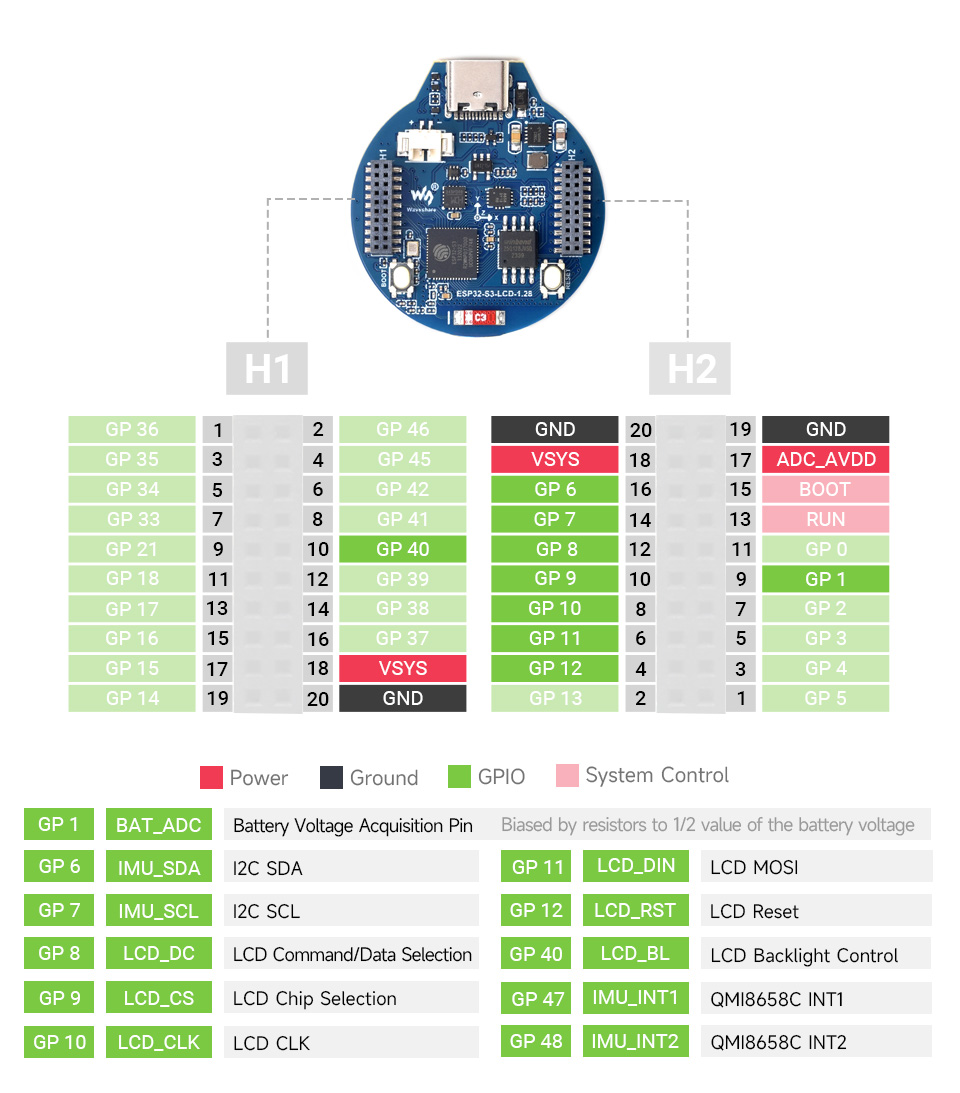
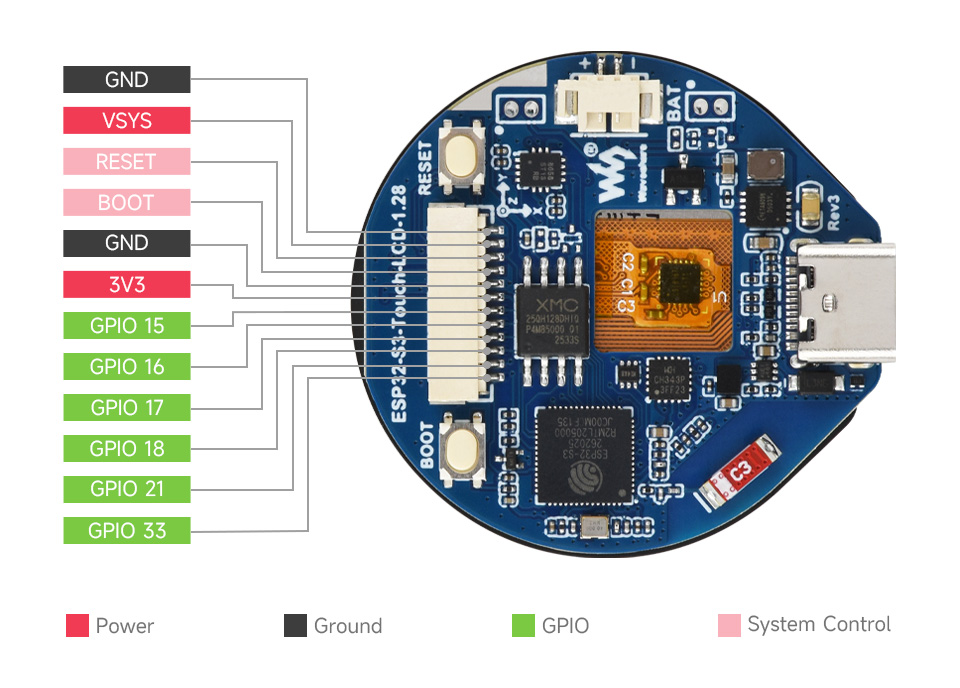
These boards are almost identical. Touch version has touch screen, while non-Touch version has two connectors exposing more GPIOs at the bottom, thus slightly different signal routes. See Pinouts and GPIO sections below for details.

Because of that similarity, a single board definition is provided by NuttX, while features and configuration details are build time Kconfig selectable:

  • CONFIG_ARCH_BOARD_ESP32S3_WS_LCD128_TOUCH selects Touch variant.

  • CONFIG_ARCH_BOARD_ESP32S3_WS_LCD128_NOTOUCH selects Non-Touch variant.

Both boards are based on existing Espressif ESP32-S3 chip implementation. WaveShare WIKI contains board details, generic examples, documentation, and schematics for the ESP32-S3-LCD-1.28 and ESP32-S3-Touch-LCD-1.28.

Note

Implementation is experimental and still early stage of development!

Features

  • ESP32-S3R2 Xtensa® 32-bit LX7 dual-core processor, up to 240MHz frequency.

  • 2.4GHz Wi-Fi (802.11 b/g/n) and Bluetooth® 5 (BLE) with onboard antenna.

  • Built in 512KB of SRAM and 384KB ROM, on-chip 2MB PSRAM, external 16MB W25Q128JVSIQ NOR Flash memory.

  • USB-C connector and CH343P USB-to-UART converter (flashing, console).

  • Onboard GC9A01A controlled round 1.28” 240×240 resolution 65K color LCD.

  • Onboard QMI8658 6-axis IMU (3-axis accelerometer and 3-axis gyroscope).

  • Onboard 3.7V MX1.25 lithium battery re/discharge header, ETA6096 charger.

  • Touch version:

    • CST816S capacitive touch display controller.

    • 6 × GPIO exposed over SH1.0 connector.

  • Non-Touch version:

    • 32 x GPIO exposed over 2 x 2x10 1.27mm female connectors.

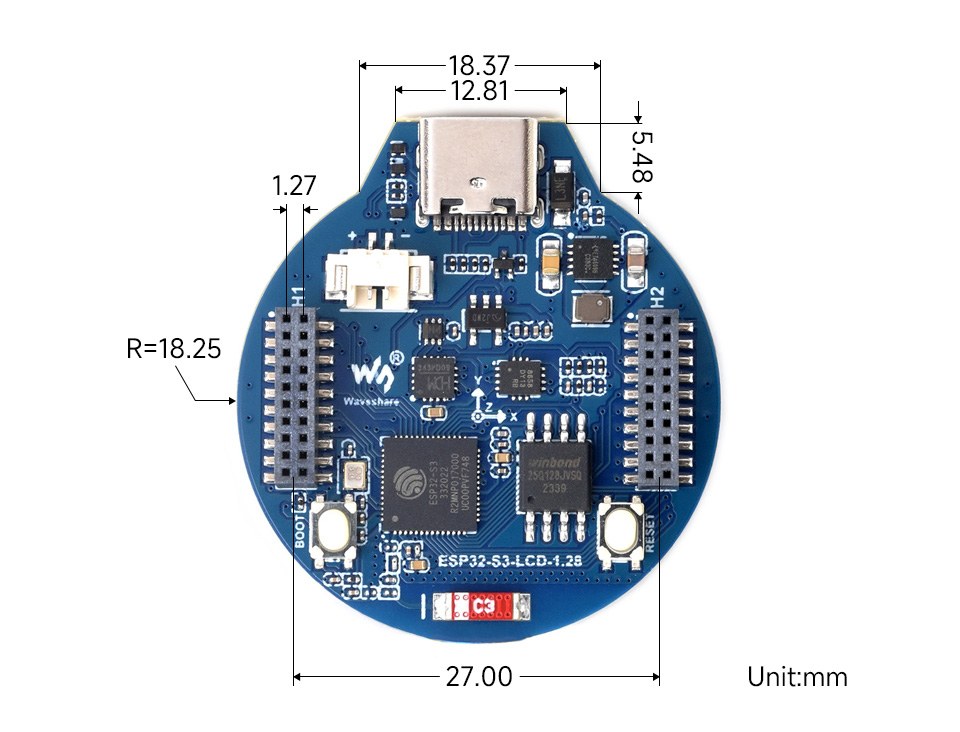
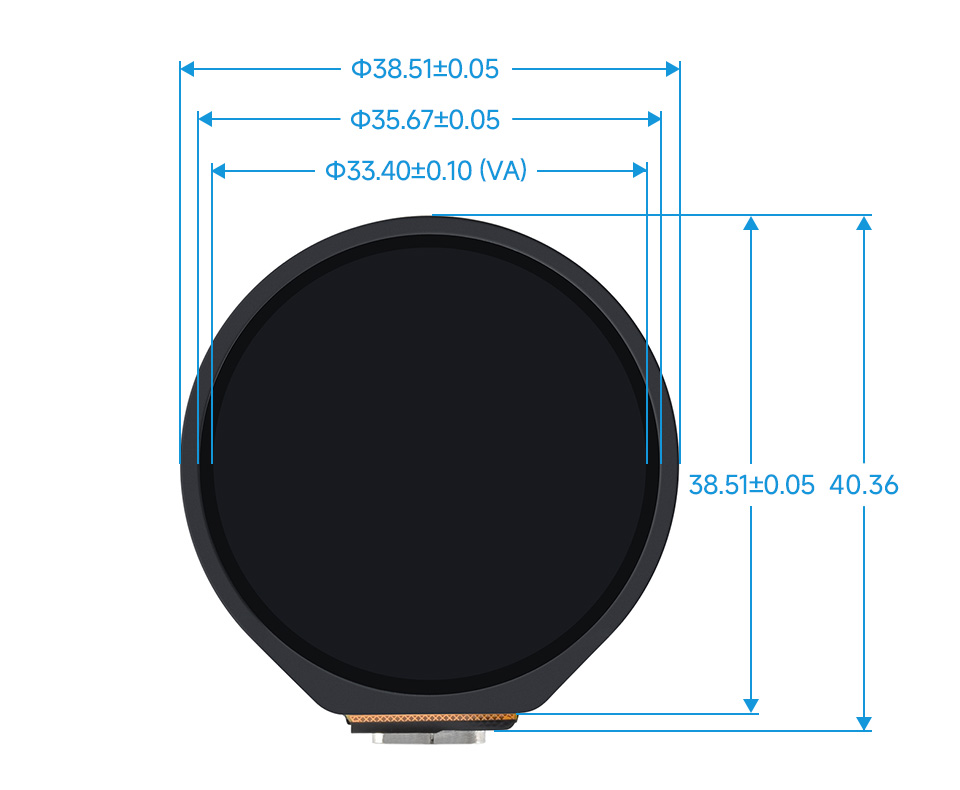
Dimensions

  • ESP32-S3-LCD-1.28:

    ../../../../../_images/ESP32-S3-LCD-1.28-details-size.jpg
  • ESP32-S3-Touch-LCD-1.28:

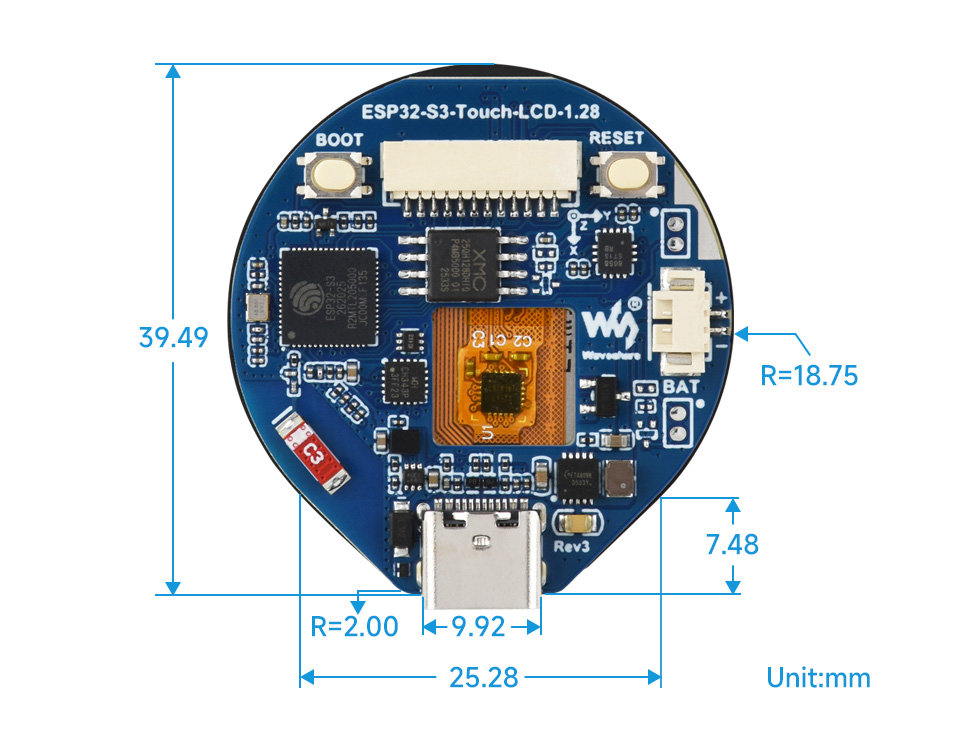
    ../../../../../_images/ESP32-S3-Touch-LCD-1.28-details-size-1.jpg
    ../../../../../_images/ESP32-S3-Touch-LCD-1.28-details-size-2.jpg

Pinouts

  • ESP32-S3-LCD-1.28:

    ../../../../../_images/ESP32-S3-LCD-1.28-details-inter.jpg
  • ESP32-S3-Touch-LCD-1.28:

    ../../../../../_images/ESP32-S3-Touch-LCD-1.28-details-inter.jpg

GPIO

Warning

ESP32-S3-LCD-1.28 pinout on the picture above is different from the schematics (picture has H2 rotated numbering but the signal names are valid)! Schematics and table below shows correct data. Issue is reported to vendor, we are waiting for the fix / update.

ESP32-S3R2

ESP32-S3-LCD-1.28

ESP32-S3-Touch-LCD-1.28

GND

H1.20, H2.1, H2.2

P2.1, P2.5

VSYS(USB5V)

H1.18, H2.3

P2.2

3V3

BAT_ADC / H2.4

P2.6

CHIP_PU

RUN/RESET / H2.8

RUN/RESET / P2.3

GPIO0

BOOT / H2.6, H2.10

BOOT / P2.4

GPIO1

BAT_ADC / H2.12

BAT_ADC / P2.6

GPIO2

GPIO2 / H2.14

LCD_BL

GPIO3

GPIO3 / H2.16

IMU_INT2

GPIO4

GPIO4 / H2.18

IMU_INT1

GPIO5

GPIO5 / H2.20

TP_INT

GPIO6

IMU_SDA / H2.5

IMU_SDA,TP_SDA

GPIO7

IMU_SCL / H2.7

IMU_SCL,TP_SCL

GPIO8

LCD_DC / H2.9

LCD_DC

GPIO9

LCD_CS / H2.11

LCD_CS

GPIO10

LCD_CLK / H2.13

CLD_CLK

GPIO11

LCD_DIN / H2.15

LCD_MOSI

GPIO12

LCD_RST / H2.17

LCD_MISO

GPIO13

GPIO13 / H2.19

TP_RST

GPIO14

GPIO14 / H1.19

LCD_RST

GPIO15

GPIO15 / H1.17

GPIO15 / P2.7

GPIO16

GPIO16 / H1.15

GPIO16 / P2.8

GPIO17

GPIO17 / H1.13

GPIO17 / P2.9

GPIO18

GPIO18 / H1.11

GPIO18 / P2.10

GPIO21

GPIO21 / H1.9

GPIO21 / P2.11

GPIO33

GPIO33 / H1.7

GPIO33 / P2.12

GPIO34

GPIO34 / H1.5

GPIO35

GPIO35 / H1.3

GPIO36

GPIO36 / H1.1

GPIO37

GPIO37 / H1.16

GPIO38

GPIO38 / H1.14

GPIO39

GPIO39 / H1.12

GPIO40

LCD_BL / H1.10

GPIO41

GPIO41 / H1.8

GPIO42

GPIO42 / H1.6

GPIO45

GPIO45 / H1.4

GPIO46

GPIO46 / H1.2

GPIO47

IMU_INT1

GPIO48

IMU_INT2

Board Buttons

There are two buttons labeled BOOT and RESET (both are exposed on board connectors):

  • RESET (active low) button is not available to the software and can be used as manual hardware reset trigger.

  • BOOT button is connected to GPIO0. On reset/power-on it can be used to trigger BootROM serial bootloader when pressed (active low) in order to flash new firmware. After reset BOOT button can be used as software input.

Serial Console

UART0 is by default used for the serial console. It connects to the on-board CH343P converter and is available on the USB-C connector that can be also used for firmware flashing.

Configurations

All of the available configurations provide basic testing utilities or serve as an example starting point for your own projects. Use them by running the following commands:

$ ./tools/configure.sh esp32s3-ws-lcd128:<config_name>
$ make flash -j ESPTOOL_PORT=<serial_port_device>

Notes:

  • <config_name> is the name of board configuration you want to use (i.e. nsh, lvgl). Then use a serial console terminal like cu or minicom configured to 115200 8N1.

  • <serial_port_device> is usually /dev/ttyUSB0 or /dev/cuaU0 depending on the OS you are using.

  • On BSD systems use GNU Make (gmake) in place of make.

coremark

Provides coremark benchmarking utility on boot:

Running CoreMark...
2K performance run parameters for coremark.
CoreMark Size    : 666
Total ticks      : 2313
Total time (secs): 23.130000
Iterations/Sec   : 951.145698
Iterations       : 22000
Compiler version : GCC14.2.0
Compiler flags   : -O3 -fno-strict-aliasing -fomit-frame-pointer -ffunction-sections -fdata-sections -fno-strength-reduce
Parallel PThreads : 2
Memory location  : HEAP
seedcrc          : 0xe9f5
[0]crclist       : 0xe714
[1]crclist       : 0xe714
[0]crcmatrix     : 0x1fd7
[1]crcmatrix     : 0x1fd7
[0]crcstate      : 0x8e3a
[1]crcstate      : 0x8e3a
[0]crcfinal      : 0x33ff
[1]crcfinal      : 0x33ff
Correct operation validated. See README.md for run and reporting rules.
CoreMark 1.0 : 951.145698 / GCC14.2.0 -O3 -fno-strict-aliasing -fomit-frame-pointer -ffunction-sections -fdata-sections -fno-strength-reduce / HEAP / 2:PThreads

notouch-lvgl

This is a demonstration of the lvgl graphics library running on the NuttX’s GC9A01A LCD driver. Demo will launch itself on boot and you should see it on the screen right away. This configuration uses the lvgldemo application.

Note

  1. This configuration has CONFIG_ARCH_BOARD_ESP32S3_WS_LCD128_NOTOUCH set. It selects LCD pins valid for the Non-Touch board variant.

  2. Colors are invalid. Pixel format to be fixed. Work in progress.

nsh

Provides nsh NuttShell as default application. Console runs on UART0 at 115200bps and is exposed via USB over CH343P chip.

qmi8658

Provides onboard QMI8658 IMU and internal ESP32S3 temperature uorb sensors example. Sensors are registered under /dev/urob/ and its data can be obtained with uorb_listener application:

nsh> ls /dev/uorb
/dev/uorb:
sensor_accel0
sensor_gyro0
sensor_temp0

nsh> uorb_listener -n 10

Monitor objects num:3
object_name:sensor_temp, object_instance:0
object_name:sensor_gyro, object_instance:0
object_name:sensor_accel, object_instance:0
sensor_temp(now:144950000):timestamp:144950000,temperature:36.000000
sensor_temp(now:145960000):timestamp:145960000,temperature:37.000000
sensor_gyro(now:145960000):timestamp:145960000,x:-4.750000,y:-0.437500,z:0.156250,temperature:32.261719
sensor_accel(now:145960000):timestamp:145960000,x:0.031250,y:-0.088867,z:-1.051392,temperature:32.261719
sensor_temp(now:146970000):timestamp:146970000,temperature:37.000000
sensor_gyro(now:146970000):timestamp:146970000,x:-4.937500,y:-0.562500,z:0.218750,temperature:32.281250
sensor_accel(now:146970000):timestamp:146970000,x:0.031738,y:-0.088623,z:-1.046265,temperature:32.281250
sensor_temp(now:147980000):timestamp:147980000,temperature:37.000000
sensor_gyro(now:147980000):timestamp:147980000,x:-4.750000,y:0.031250,z:0.437500,temperature:32.273438
sensor_accel(now:147980000):timestamp:147980000,x:0.031005,y:-0.088745,z:-1.049683,temperature:32.273438
Object name:sensor_temp0, received:4
Object name:sensor_gyro0, received:3
Object name:sensor_accel0, received:3
Total number of received Message:10/10

ostest

Provides ostest NuttX self-test utility:

nsh> ostest
stdio_test: write fd=1
stdio_test: Standard I/O Check: printf
stdio_test: write fd=2
stdio_test: Standard I/O Check: fprintf to stderr
ostest_main: putenv(Variable1=BadValue3)
ostest_main: setenv(Variable1, GoodValue1, TRUE)
ostest_main: setenv(Variable2, BadValue1, FALSE)
ostest_main: setenv(Variable2, GoodValue2, TRUE)
ostest_main: setenv(Variable3, GoodValue3, FALSE)
ostest_main: setenv(Variable3, BadValue2, FALSE)
show_variable: Variable=Variable1 has value=GoodValue1
show_variable: Variable=Variable2 has value=GoodValue2
show_variable: Variable=Variable3 has value=GoodValue3
ostest_main: Started user_main at PID=3

(..)

End of test memory usage:
VARIABLE  BEFORE   AFTER
======== ======== ========
arena       5d378    5d378
ordblks         5        5
mxordblk    542d0    542d0
uordblks     47e8     47e8
fordblks    58b90    58b90

Final memory usage:
VARIABLE  BEFORE   AFTER
======== ======== ========
arena       5d378    5d378
ordblks         1        5
mxordblk    58c28    542d0
uordblks     4750     47e8
fordblks    58c28    58b90
user_main: Exiting
ostest_main: Exiting with status 0

touch-lvgl

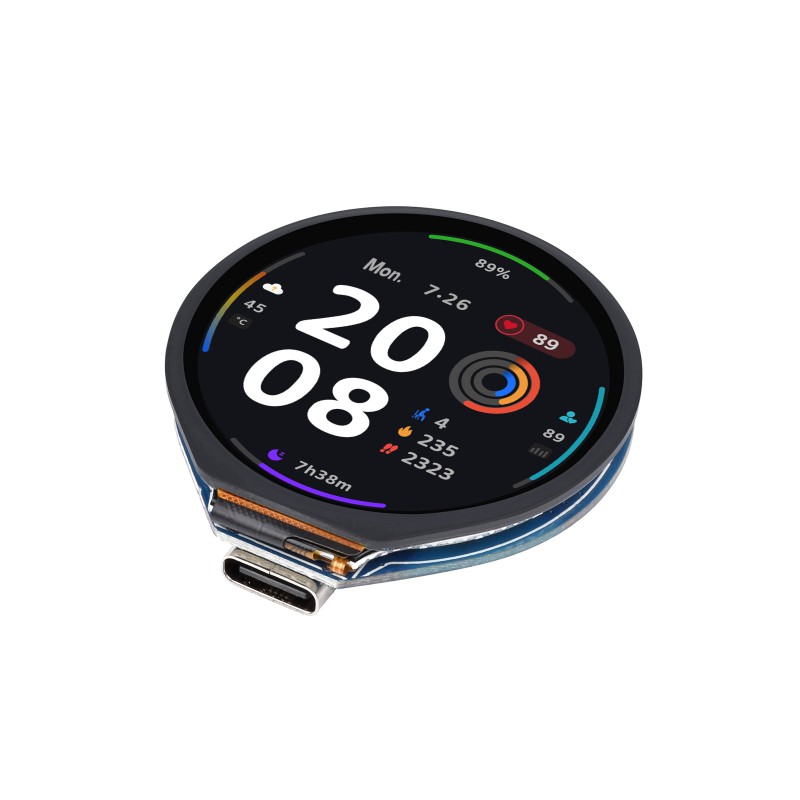
This is a demonstration of the lvgl graphics library running on the NuttX’s GC9A01A LCD driver. Demo will launch itself on boot and you should see it on the screen right away. This configuration uses the lvgldemo application.

Note

  1. This configuration has CONFIG_ARCH_BOARD_ESP32S3_WS_LCD128_TOUCH set. It selects LCD pins valid for the Touch board variant.

  2. Colors are invalid. Pixel format to be fixed. Work in progress.

  3. Touch screen driver (I2C/CST816S) is not yet implemented! Work in progress.
watchdog

Provides watchdog testing utility:

nsh> wdog
 ping elapsed=0
 ping elapsed=500
 ping elapsed=1000
 ping elapsed=1500
 ping elapsed=2000
 ping elapsed=2500
 ping elapsed=3000
 ping elapsed=3500
 ping elapsed=4000
 ping elapsed=4500
 NO ping elapsed=5000
 NO ping elapsed=5500
 NO ping elapsed=6000

 ESP-ROM:esp32s3-20210327
 Build:Mar 27 2021
 rst:0x7 (TG0WDT_SYS_RST),boot:0x18 (SPI_FAST_FLASH_BOOT)