vncviewer VNC Viewer
A lightweight VNC viewer that renders a remote desktop on an LCD display via
the NuttX LCD character device interface (/dev/lcd0).
Features:
RFB 3.8 protocol with VNC Authentication (pure software DES, no external library)
Auto-detect pixel format from LCD driver
Raw encoding with row-by-row rendering — minimal RAM usage
Automatic reconnection on disconnect
Prepare
Enable the VNC Viewer application (Device):
CONFIG_NET_TCP=y
CONFIG_LCD=y
CONFIG_SYSTEM_VNCVIEWER=y
Ensure the device has a working LCD driver (
/dev/lcd0) and TCP/IP network connectivity.Install a VNC server on the host. For example, on Ubuntu:
sudo apt install x11vnc xvfb openbox xterm
Usage
vncviewer [options] <host> [port]
Options:
-p <password>— VNC password-d <devno>— LCD device number (default: 0)-h— Show help
Default port: 5900
Host VNC Server Configuration
Three server modes are supported:
1. Xvfb Virtual Desktop (Pixel-Perfect 1:1)
Create a virtual framebuffer matching the LCD resolution (e.g., 320×240):
# Start virtual display
Xvfb :1 -screen 0 320x240x16 &
DISPLAY=:1 openbox &
DISPLAY=:1 xterm -geometry 38x11+0+0 -fa Monospace -fs 10 &

# Start VNC server
x11vnc -display :1 -rfbport 5901 -passwd mypasswd -shared -forever -xkb -add_keysyms -bg
On the device:
vncviewer -p mypasswd <host_ip> 5901
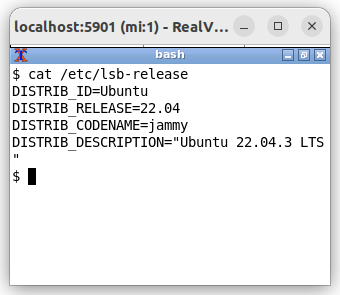
Xvfb virtual desktop — host side (320×240 xterm in VNC viewer)
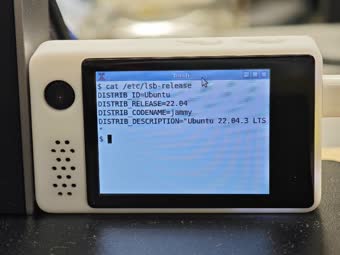
Xvfb virtual desktop — device side (rendered on ST7789 LCD)
2. Physical Desktop Clip (Top-Left Region)
Clip a region of the physical desktop matching the LCD resolution:
x11vnc -display :0 -rfbport 5901 -passwd mypasswd -shared -forever -xkb -add_keysyms -bg -clip 320x240+0+0
On the device:
vncviewer -p mypasswd <host_ip> 5901
3. Physical Desktop Scaled
Scale the full desktop down to the LCD resolution:
x11vnc -display :0 -rfbport 5901 -passwd mypasswd -shared -forever -xkb -add_keysyms -bg -scale 320x240
On the device:
vncviewer -p mypasswd <host_ip> 5901
Examples
Connect to a VNC server with password:
vncviewer -p mypasswd 192.168.1.100 5901
Connect using a different LCD device:
vncviewer -d 1 -p mypasswd 192.168.1.100 5900